How we brought an existing app's data from Dataverse into Microsoft Fabric and built a data model around it for Power BI reporting.
Power Apps have become a popular way to move a business process out of spreadsheets and into something more structured. Instead of editing a shared Excel file, users fill in simple forms with dropdowns and validation on their desktop or phone. Behind the scenes, the app can save to a wide range of data sources through connectors, including Dataverse, SharePoint and SQL. Before long, someone asks the natural next question:
"Can we get proper reporting out of this?"
Connecting Power BI directly to the app's data source is often a sensible place to start, and for simple operational views it works well. But as reporting needs grow, with more reports, more history, tighter security and more questions that span tables, it helps to have a data model designed for reporting sitting alongside the app.
We recently worked with a New South Wales electricity distributor whose Power App was already well established, with its data stored in Dataverse. Our job was to bring that data into Microsoft Fabric and build a proper data model around it, so that Power BI reporting ties back cleanly to what people see in the app.
Ideally, reporting is designed alongside an app from day one. In practice, many apps grow first and reporting catches up later, which was the case here. So rather than redesign the app, we built a model around what already existed.
When reporting outgrows Dataverse
Many teams report directly from Dataverse, and for operational views that works well. As reporting grows, a few things get harder:
- History Dataverse holds the current state of each record. Keeping snapshots over time for trend reporting is much easier in a warehouse.
- Scale and performance Larger datasets and more complex reports run better against a model built for analytics than against the app's transactional tables.
- Combining sources Reporting often needs data from outside the app, such as finance or HR data, which is simpler to bring together in Fabric.
- One set of rules. A single governed model means every report uses the same definitions, filters and security.
The approach: a medallion model built around the app
We landed the app's data in Microsoft Fabric and shaped it through three layers.
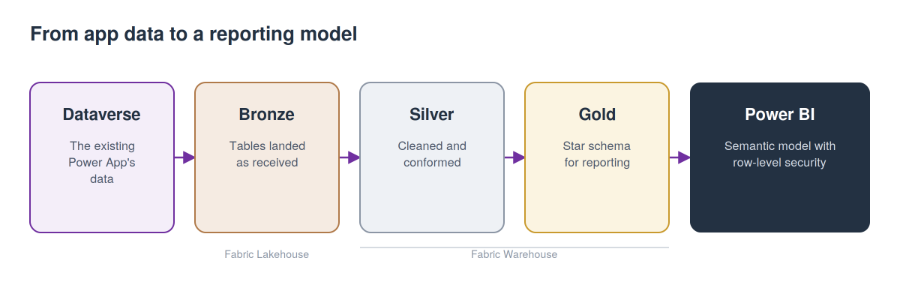
The app stays as it is. The model is built around it.
- Bronze holds the Dataverse tables as received, so there is always a faithful copy of the source.
- Silver cleans and conforms them. Codes become labels, IDs become readable values, and current and deleted records are flagged consistently.
- Gold models the data as a star schema of facts and dimensions, designed around the questions the business actually asks.
Every Gold table is built to the same pattern, ending in a presentation view that Power BI reads. As the app evolves and new fields are added, bringing them into reporting is a well-trodden path, and rules like excluding deleted records are applied once rather than in every report.
Modelling what the app captures
Most of the effort went into the parts of the data that don't fit neatly into rows and columns:
- Many-to-many relationships are handled with bridge tables rather than forcing a single value.
- IDs become readable names, with fallbacks, so reports show who did what.
- The business calendar, such as the financial year, is built into a shared date dimension.
- Definitions are aligned at source with other teams, rather than patched in each report.
Security that mirrors the app
Reports should respect the same idea of ownership as the app. We drove Power BI row-level security from organisational reporting lines and the app's own access data, so people see what they are responsible for, and access granted in the app carries through to the reports.
Where else this applies
The same approach suits any Power App whose data has become important enough to report on properly. Leave the app to do what it does well, bring its data into Fabric, and build a model around it that the business can trust. A clearly described model is also a good foundation for AI features like Copilot in Power BI.
The app captures the data. A good data model makes it easy to trust.
Interested in exploring something similar?
If you have a Power App whose data never quite makes it into trusted reporting, we'd love to have a conversation.
Contact the One51 team to talk through building a Fabric data model around your apps.